
Process Mapping Automation
You can't improve a process you can't see — and the whiteboard version is already wrong.
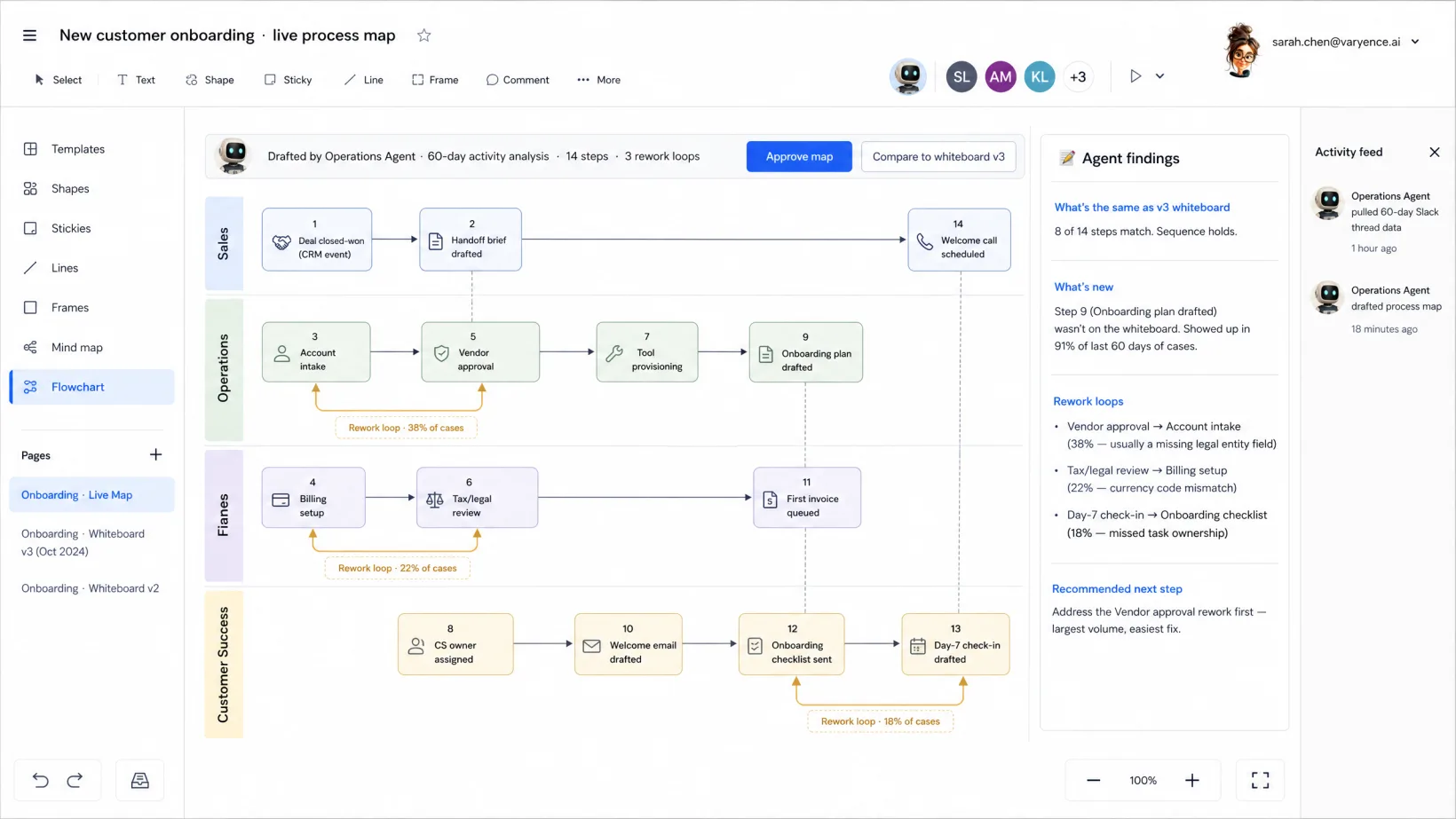
Process mapping software that draws your real workflows — pulled from the activity in your tools, not from someone’s whiteboard. Where work stalls, where rework happens, where handoffs miss. You review and approve the maps. Optimizations are obvious because the data showed them.
~12 hrs/mapping cycle back to you · real workflow map ready in days, not weeks of interviews
HOW IT WORKS
Three steps per process.
Managed service. We do the setup, the agent orchestration, the exception handling. You own the decisions.
Step 1
Agents trace work across your tools.
Tickets touched, Slack messages exchanged, deal stages crossed, emails sent — each work item’s path captured across every system it traverses. From birth to completion, with timestamps.
Step 2
Agents draw the map. Hot spots come flagged.
Visual flow with stage durations, throughput, rework loops, abandoned threads. Bottlenecks highlighted with supporting data — e.g. ‘30% of tickets stall at handoff between Support and Engineering for >4 days.’
Step 3
Your Process Lead reviews. Optimizations get prioritized.
One map, real-time data. Approve as the current state; flag the priority bottlenecks for the improvement queue. No more ‘we think the issue is here’ — the data says where.
Where the line sits.
Agents run the repetitive work your ops lead / Process Lead shouldn’t be doing. You stay in charge of the judgment.
Specifically, agents don't:
- Publish a process map to leadership without your Process Lead's approval.
- Surface employee-level performance data without anonymizing the cohort.
- Share workflow diagrams with vendors or auditors without your review.
A human approves anything that changes your books, your customers, your compliance posture, or your people. Every time.
YOUR DATA STAYS YOURS.
Agents read what they need to do the work. Nothing is stored on our side. Nothing is used to train models.
PRODUCTION-READY ON DAY ONE.
Every deployment includes governance and approval chains, role-based access control, monitoring, and model management.
Ready to pressure-test it?
Talk to an agent or drop a note. We'll come back with a proposal.
FAQ
Frequently Asked Questions
Yes. Agents segment by customer type, team, or work type during kickoff. The map shows variance, not just averages.
It probably will. That’s the point. Your Process Lead decides what surfaces and what stays in the work-improvement queue.
No. Agents draw the actual process from real data; your Lucidchart still hosts strategic future-state diagrams. Different jobs.
Three deployment options: our compliant environment, your cloud, or on-prem. Data stays in the perimeter you pick. Agents read inline to do the work — nothing copied, stored, or used to train models.
Let's look at your workflow together.
Talk it through with an operator now, or send a note. Tell us what's eating your week — we're here to take routine work off your team's plate so they move faster on what matters.

LIVE · TALK OR TYPE
Talk it through with your operator.
A few minutes with the operator who knows this kind of work. Tell them what's slowing you down; if it's a fit, we'll line up a human follow-up to take it further.
Talk or type — your choice. No phone number needed.
ASYNC · 1 BUSINESS DAY REPLY
Or send us your workflow.
Tell us what eats your week. We read every one and reply within a business day.