
Sprint Planning Automation
The team spends the first hour of sprint planning figuring out what they're working on.
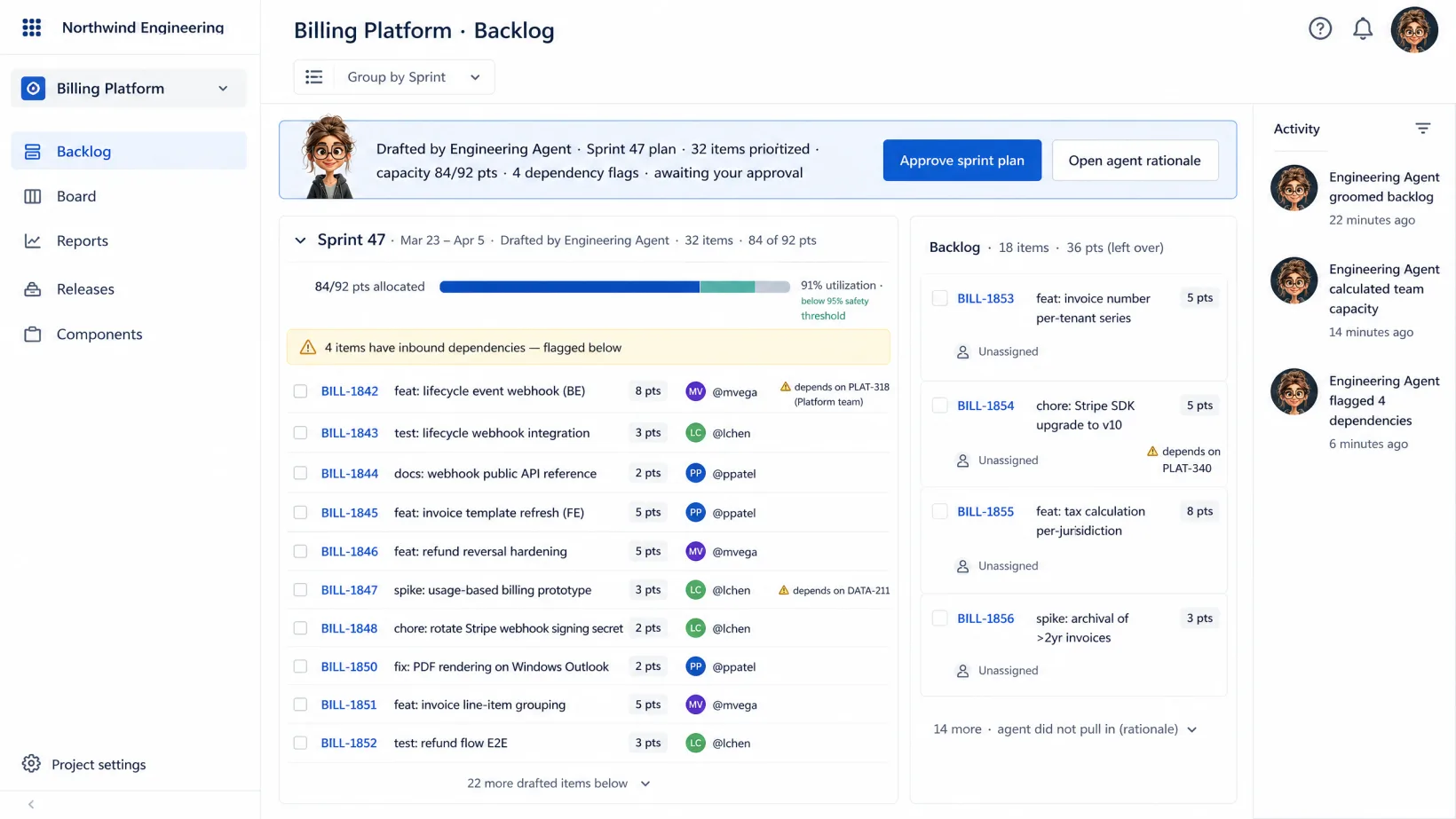
Jira automation that grooms the backlog, calculates capacity, flags dependencies, and drafts the sprint plan before planning starts. You approve the plan; the team walks into planning to decide priorities, not rediscover what’s there.
~4 hrs/sprint back to you · backlog groomed, capacity calculated, plan drafted before planning
HOW IT WORKS
Three steps per sprint.
Managed service. We do the setup, the agent orchestration, the exception handling. You own the decisions.
Step 1
Agents groom the backlog before planning.
Pulled from Jira, Linear, GitHub Issues, or wherever your tickets live. Stale tickets archived, missing acceptance criteria flagged, dependencies surfaced, prior commits checked against the same epics.
Step 2
Agents calculate capacity and draft the sprint plan.
Velocity history, planned PTO, on-call rotations, dependencies on other teams — capacity computed per engineer. A draft sprint plan proposed against the priority list, with the trade-offs shown.
Step 3
Your engineering manager approves the plan. Team walks into priorities.
Open the draft, see the proposed scope and the risks. Approve to start the sprint; rework where the data missed. Planning meetings shrink to discussion, not data hunting.
Where the line sits.
Agents run the repetitive work your VP Engineering / Engineering Manager shouldn’t be doing. You stay in charge of the judgment.
Specifically, agents don't:
- Commit a sprint scope to stakeholders without your engineering manager's approval.
- Reassign tickets across engineers without flagging the change.
- Close or archive a ticket without flagging it for owner review.
A human approves anything that changes your books, your customers, your compliance posture, or your people. Every time.
YOUR DATA STAYS YOURS.
Agents read what they need to do the work. Nothing is stored on our side. Nothing is used to train models.
PRODUCTION-READY ON DAY ONE.
Every deployment includes governance and approval chains, role-based access control, monitoring, and model management.
Ready to pressure-test it?
Talk to an agent or drop a note. We'll come back with a proposal.
FAQ
Frequently Asked Questions
Yes. Kickoff captures your cadence — 1-week sprints, 2-week sprints, continuous Kanban with capacity reviews. Agents adapt to your rhythm.
Override the capacity number; agents learn the new constraint and recompute. The data is shown alongside, so you see what was missed.
No. Agents sit on top of whichever tracker you use. Your Jira keeps the tickets; agents do the grooming, capacity math, and draft.
Three deployment options: our compliant environment, your cloud, or on-prem. Data stays in the perimeter you pick. Agents read inline to do the work — nothing copied, stored, or used to train models.
Let's look at your workflow together.
Talk it through with an operator now, or send a note. Tell us what's eating your week — we're here to take routine work off your team's plate so they move faster on what matters.

LIVE · TALK OR TYPE
Talk it through with your operator.
A few minutes with the operator who knows this kind of work. Tell them what's slowing you down; if it's a fit, we'll line up a human follow-up to take it further.
Talk or type — your choice. No phone number needed.
ASYNC · 1 BUSINESS DAY REPLY
Or send us your workflow.
Tell us what eats your week. We read every one and reply within a business day.