
Incident Management Automation
The same senior engineer gets paged at 2am. Four times this quarter. They quit by Q3.
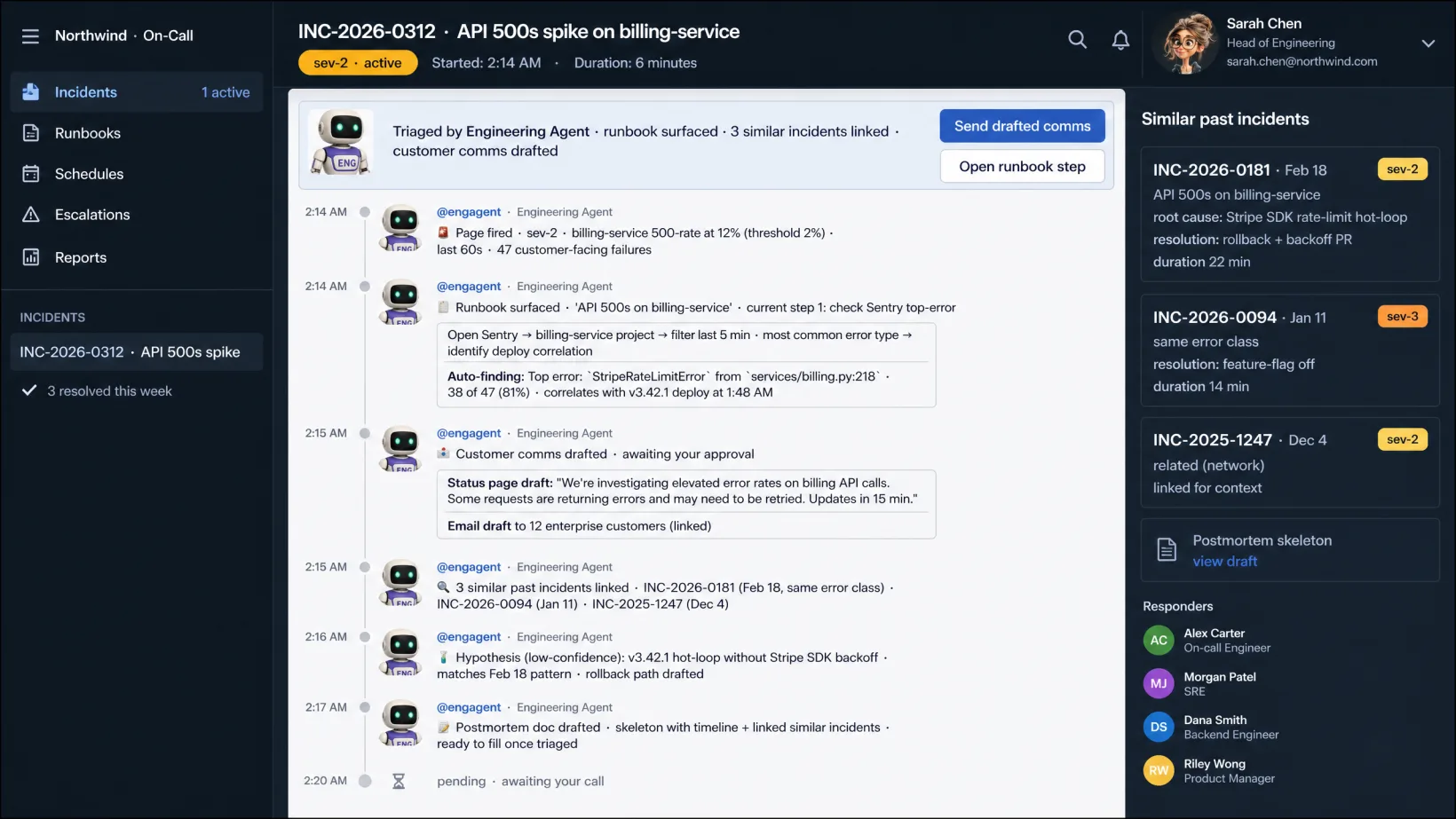
Incident management software that triages every page — surfaces the runbook, links similar past incidents, drafts the customer-facing comms, and routes ownership. You decide; agents handle the doc, the timeline, and the postmortem draft.
~30 min/incident instead of 2 hrs · runbook, comms, postmortem drafted while you triage
HOW IT WORKS
Three steps per incident.
Managed service. We do the setup, the agent orchestration, the exception handling. You own the decisions.
Step 1
Agents triage every page the moment it fires.
From PagerDuty, Opsgenie, Datadog, Sentry, or wherever alerts originate. Severity scored, runbook surfaced, similar past incidents linked, owner suggested — before your on-call has finished reading the page.
Step 2
Agents draft the comms and run the timeline.
Customer-facing status page drafted. Internal Slack channel created and updated. Timeline written as the incident unfolds. Stakeholders auto-notified per severity. Your on-call handles the technical call; everything else writes itself.
Step 3
Your on-call resolves. Agents draft the postmortem.
Once the incident closes, the postmortem draft lands with timeline, root cause hypothesis, contributing factors, and follow-up actions. Your SRE lead reviews and approves before publishing.
Where the line sits.
Agents run the repetitive work your VP Engineering / Head of SRE shouldn’t be doing. You stay in charge of the judgment.
Specifically, agents don't:
- Update a customer-facing status page or send a customer email without your on-call's sign-off on the wording.
- Mark an incident resolved when the symptoms remain — agents flag, your on-call decides.
- Publish a postmortem to customers, auditors, or regulators without your Head of SRE's approval.
A human approves anything that changes your books, your customers, your compliance posture, or your people. Every time.
YOUR DATA STAYS YOURS.
Agents read what they need to do the work. Nothing is stored on our side. Nothing is used to train models.
PRODUCTION-READY ON DAY ONE.
Every deployment includes governance and approval chains, role-based access control, monitoring, and model management.
Ready to pressure-test it?
Talk to an agent or drop a note. We'll come back with a proposal.
FAQ
Frequently Asked Questions
Yes. Kickoff captures your severity matrix, runbook structure, comms templates, and escalation policy. Agents apply your process; you don’t change how you run incidents.
Severity overrides are one click. Agents learn from the override and update the rule. Nothing customer-facing goes out before your on-call sign-off, so a misclassification doesn’t reach users.
No. We sit on top — reading from your existing alerting and incident-response tools. PagerDuty still pages; agents handle the orchestration around the page.
Three deployment options: our compliant environment, your cloud, or on-prem. Data stays in the perimeter you pick. Agents read inline to do the work — nothing copied, stored, or used to train models.
Let's look at your workflow together.
Talk it through with an operator now, or send a note. Tell us what's eating your week — we're here to take routine work off your team's plate so they move faster on what matters.

LIVE · TALK OR TYPE
Talk it through with your operator.
A few minutes with the operator who knows this kind of work. Tell them what's slowing you down; if it's a fit, we'll line up a human follow-up to take it further.
Talk or type — your choice. No phone number needed.
ASYNC · 1 BUSINESS DAY REPLY
Or send us your workflow.
Tell us what eats your week. We read every one and reply within a business day.