
Variance Analysis Automation
You spend two hours typing variance explanations for the fifteen minutes of judgment that actually matter.
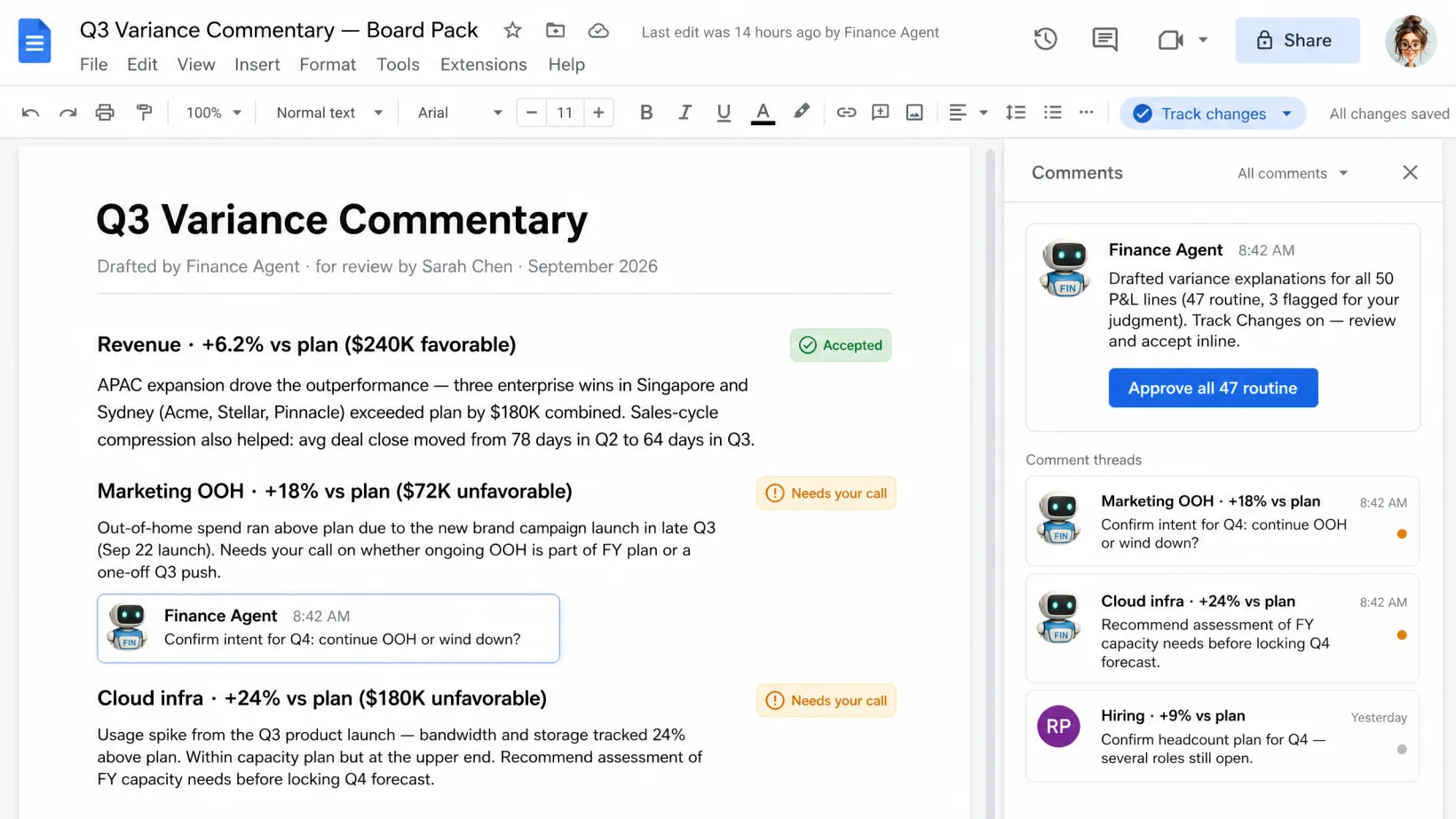
Agents draft an explanation for every line that moved — pulled from the actuals, the budget, and the last board deck. You confirm the two or three that matter; the rest is already written.
15 min/cycle instead of 2 hrs · every variance line drafted before you open the deck
HOW IT WORKS
Three steps per variance pack.
Managed service. We do the setup, the agent orchestration, the exception handling. You own the decisions.
Step 1
Agents pull actuals against the budget at close.
From your ERP and FP&A tool — NetSuite, QBO, Cube, Vena, wherever budgets and actuals meet. Every line that moved gets queued for explanation before the close pack ships.
Step 2
Each line that moved gets a one-sentence draft reason.
Drafted from the actuals, the budget, and the last board deck. The ones that need your voice are marked. The ones that are obvious — timing, accrual trueups — already have their answer.
Step 3
You confirm the two or three that matter. The rest is already written.
Review takes fifteen minutes instead of two hours. Confirm the material variances with your commentary or tweak the wording — agents publish the pack after your sign-off.
Where the line sits.
Agents run the repetitive work your finance lead and Controller shouldn’t be doing. You stay in charge of the judgment.
Specifically, agents don't:
- Publish a variance pack without your Controller approving the material explanations.
- Mark a variance ‘immaterial’ when it crosses your materiality threshold.
- Share variance commentary with your board or auditors without your review.
A human approves anything that changes your books, your customers, your compliance posture, or your people. Every time.
YOUR DATA STAYS YOURS.
Agents read what they need to do the work. Nothing is stored on our side. Nothing is used to train models.
PRODUCTION-READY ON DAY ONE.
Every deployment includes governance and approval chains, role-based access control, monitoring, and model management.
Ready to pressure-test it?
Talk to an agent or drop a note. We'll come back with a proposal.
FAQ
Frequently Asked Questions
Yes. Thresholds configure per P&L segment, cost center, or business unit. Agents apply the right rule to each line.
You flag it in review and rewrite in one line. Agents learn from your edits and improve the next cycle’s drafts.
No. We layer on top of your ERP and FP&A tool — drafting the explanations you’d otherwise write by hand. Your stack stays.
Three deployment options: our compliant environment, your cloud, or on-prem. Data stays in the perimeter you pick. Agents read inline to do the work — nothing copied, stored, or used to train models.
Let's look at your workflow together.
Talk it through with an operator now, or send a note. Tell us what's eating your week — we're here to take routine work off your team's plate so they move faster on what matters.

LIVE · TALK OR TYPE
Talk it through with your operator.
A few minutes with the operator who knows this kind of work. Tell them what's slowing you down; if it's a fit, we'll line up a human follow-up to take it further.
Talk or type — your choice. No phone number needed.
ASYNC · 1 BUSINESS DAY REPLY
Or send us your workflow.
Tell us what eats your week. We read every one and reply within a business day.